


Can You Build a Website Yourself with AI? What You Gain and What You Risk
Yes, you can. With ChatGPT, Claude or an AI website builder, you can have a simple site up in an afternoon, sometimes for free. But if your website takes payments, bookings or customer details, or your business depends on it for enquiries, you’ll be safer with a professional web design company in Nepal.
Hardly a week goes by now without a client asking us some version of this: “If AI can write the code, why should I pay for a website?” Honestly, it’s a fair question. AI has made basic websites faster and cheaper to start, and we’re not going to pretend otherwise. We use these tools in our own work every day.
But a business website is more than code on a screen. It has to load fast, show up on Google, stay secure and keep bringing in customers month after month, long after the excitement of launch day.
So here’s an honest look at what you gain, what you risk, and how to decide.
The AI Tools People Are Actually Using
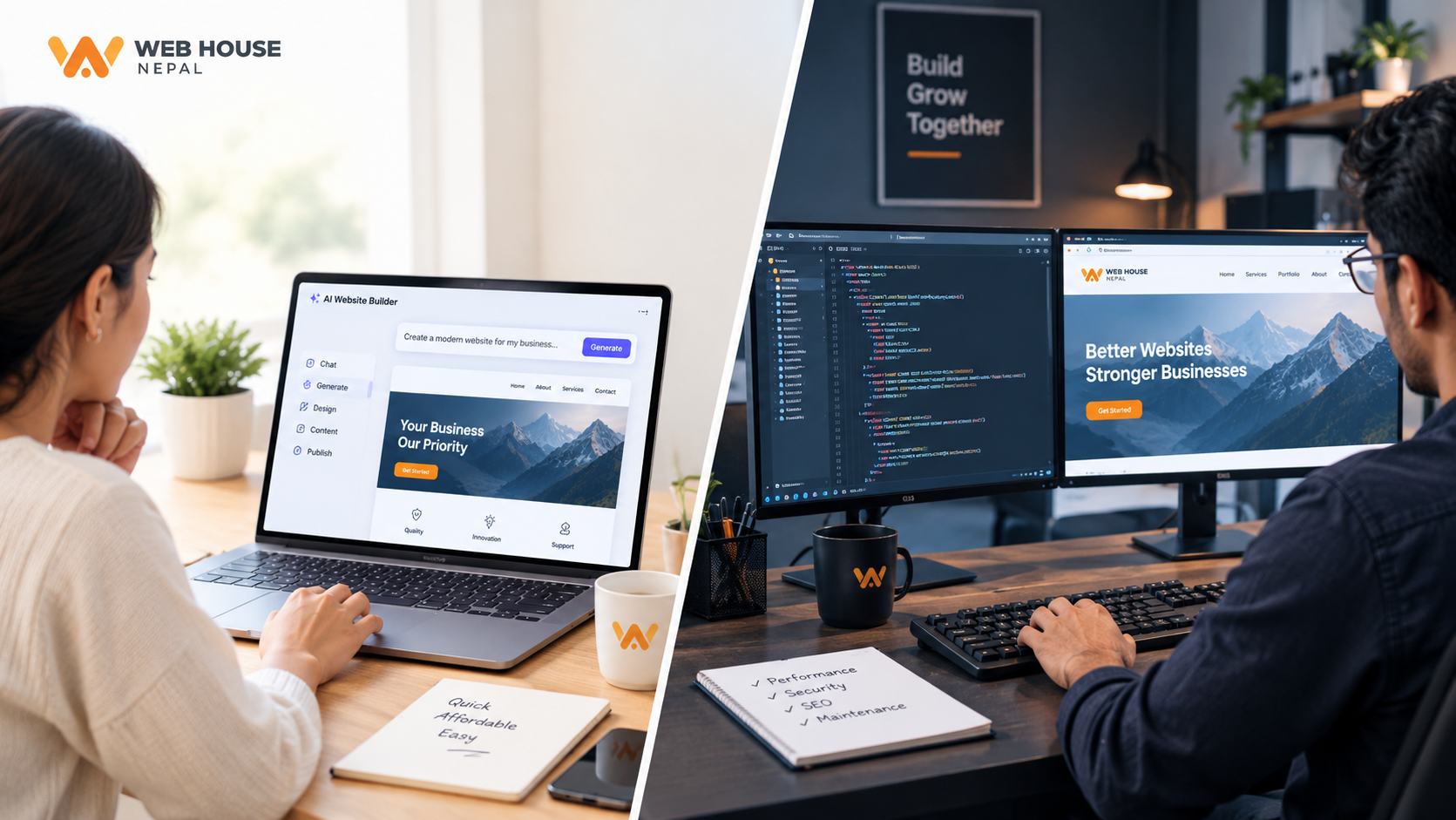
When someone tells us “I’ll just build it with AI”, they usually mean one of three things:
- Chat assistants like ChatGPT, Claude and Gemini. They write the code and the content and explain each step, but you put the site online yourself.
- AI website builders like Hostinger, Wix and Framer. You answer a few questions, and they generate a site and host it for you.
- AI app builders like Lovable, Bolt, Replit and v0. You describe what you want, and they build it and publish it with one click. Using your own domain usually needs a paid plan, typically around US$20 to $25 a month.
Not long ago, AI could write code but couldn’t put it online. That has changed. Many of these tools now publish your site and connect your domain for you. So the real question isn’t whether AI can get a website live anymore. It’s who looks after it once it is.
We wrote more about this shift in our post on the impact of AI on the web industry.
What You Gain by Building with AI
Used well, AI is a genuine help, and the benefits are real:
- It’s cheap to start. You can get a design, code and content for free or for a small monthly fee.
- It’s fast. A simple site can be live in a day instead of a few weeks.
- You’re in control. You can change a headline or swap a photo whenever you like, without waiting on anyone.
- You learn as you go. You’ll understand how your own website works, which helps later even if you do hire someone.
- It helps with the fiddly bits. AI can write SEO titles and meta descriptions, suggest layouts and colours, walk you through pointing your DNS, and help you fix an error when you paste in the message.
For a personal portfolio, an event page or a quick prototype, that may be all you need. If that’s you, our step-by-step guide on how to create a website for free will help.
What AI Still Can’t Do for You
This is where a lot of DIY projects quietly stall.
- It only works when you ask. AI can publish your site, but it doesn’t keep an eye on it afterwards. If the site goes down at 2 AM, nobody knows until a customer tells you.
- It works with your access, at your risk. Handing an AI tool your hosting or admin login is quick. But if it runs the wrong command, or a password ends up somewhere it shouldn’t, the mess is yours to sort out.
- It can’t do your paperwork. Before you can take a single online payment in Nepal, the payment company needs your business registration, PAN or VAT certificate and tax clearance. No AI can sign that for you.
- It doesn’t take responsibility. If the setup has a flaw, there’s no company to call and no warranty.
- It doesn’t know your customers. It works from your description, not from watching real people use your site.
So the realistic version of DIY looks like this: AI builds and explains, and you secure, monitor and maintain everything, for as long as the site is live.
9 Risks of Building Your Business Website Yourself
1. All the technical work lands on you
Hosting, backups, SSL renewals, software updates, security patches. All of it becomes your job. And when something breaks, you’re the one up late searching forums for the cause. Most business owners we meet would rather spend that time on their business, which is exactly why our website maintenance service exists.
2. Security is easy to get wrong
Self-built sites often have weak contact forms, outdated plugins or admin panels left wide open. There’s a newer habit to watch out for too: pasting passwords and API keys straight into an AI chat. A hacked site can leak customer details and enquiries, and Google may flag it as unsafe, which hurts your ranking. The risk is highest when your site handles logins, payments or personal data.
3. It takes more time than you think
A simple site might take a weekend. A site with a CMS, a booking system or an online store can take weeks of testing, fixing and rebuilding. Every one of those hours comes out of running your actual business.
4. Looking good isn’t the same as getting enquiries
AI can give you a tidy layout. What it can’t do is sit with your customers. A professional team designs around how your customers think, tests on real phones (including budget phones on slow mobile data), and checks where visitors drop off. If your site gets visitors but few enquiries, have a look at 7 signs your business website is quietly losing you customers. This is also what our UI/UX design service is all about.
5. Local integrations are harder than they look
This is the part global AI tools know least about. Connecting eSewa, Khalti, Fonepay or ConnectIPS means a merchant application with your business documents (usually a registration certificate, PAN or VAT certificate, tax clearance and a KYM form), then sandbox testing before you go live. Add IRD-compliant billing, SMS alerts and Nepali Unicode text that displays properly on every phone, and there’s a lot that can go wrong. One small mistake can mean failed payments or orders that never reach you.
6. SEO and speed need ongoing care
Page speed, structured data, indexing and Core Web Vitals don’t fix themselves after launch. Ranking on Google takes steady, continuous work. If you’re just starting, read our beginner’s guide to SEO for Nepali businesses, or see our SEO services.
7. When something breaks, nobody knows your site
An AI tool only knows what you tell it in that chat. A support team keeps records of your server, your code and every change made. So when your site goes down in the middle of your busy season, someone who already knows the setup can get it back up quickly. With DIY, you start from scratch with every problem, and if the AI’s advice was wrong, you carry the cost.
8. It doesn’t grow well
A site that works fine with 10 pages and 100 visitors can turn slow and messy at 500 pages and 10,000 visitors if there’s no solid structure underneath. Rebuilding later almost always costs more than building it properly the first time.
9. The hidden costs add up
Premium themes, plugins, stock photos, a paid AI plan to use your own domain, business email, and above all your own time. The cheapest route at the start is often not the cheapest after a year. We break this down in why the cheapest website quote usually costs the most.
What We See in Our Own Work
Most of the rescue work that comes to us has little to do with how a site was built. It’s about what happened after launch.
This year alone, we’ve upgraded a long list of client websites that were still running old PHP versions with no security updates, and cleaned up security problems along the way. We’ve also seen an online store’s app lose its entire source code because a server wasn’t renewed on time. Only the data backup survived.
None of these were AI problems. They were ownership and maintenance problems. An AI-built site has exactly the same ones, just with nobody assigned to watch for them.
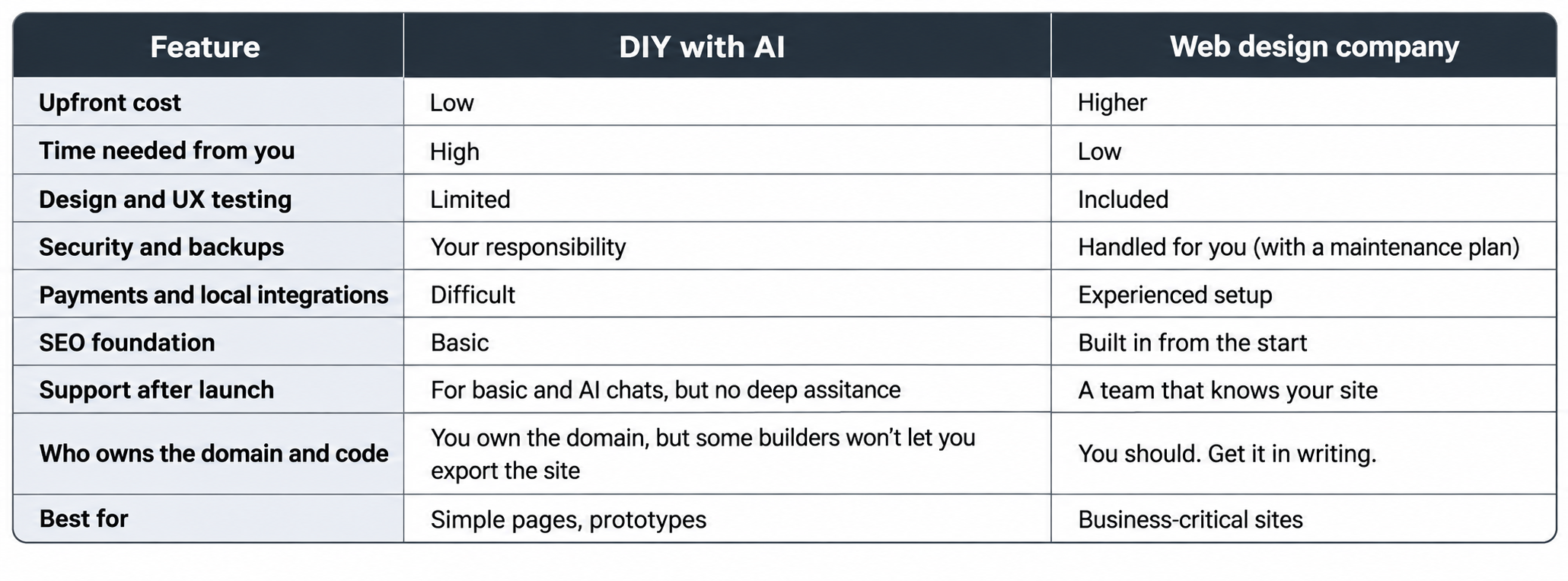
DIY with AI vs a Web Design Company
When DIY with AI Makes Sense
- A personal portfolio, event page or simple landing page
- A quick prototype before you hire someone
- A very tight budget, where you can live with some risk
- You enjoy learning and have time to look after the site
When You Should Hire a Company
- You take online payments, bookings, logins or customer data
- Your business depends on the website for revenue, like a hotel, trekking company, school or online store (see our guides to travel and tours websites and e-commerce websites)
- You want SEO, marketing and support handled together
- You don’t have time to manage hosting, updates and security
Not sure which works out cheaper? Here’s our breakdown of website design and development prices in Nepal, and our comparison of a web development company vs a freelance developer.
Going DIY Anyway? Do These 5 Things First
- Register the domain in your own name. Not your developer’s, and not your cousin’s. Here’s how .np domain registration works, and how to choose between web hosting companies in Nepal.
- Turn on SSL and automatic backups, and keep the backups somewhere other than your server.
- Never store card details on your site. Use the hosted checkout from eSewa, Khalti or Fonepay instead.
- Keep passwords out of AI chats. Never paste admin logins or API keys into ChatGPT, Claude or any other tool.
- Set up a free uptime monitor, so you hear about downtime before your customers do.
A Smart Middle Option
You don’t have to pick one extreme. Plenty of owners use AI to draft their content, plan the pages and collect ideas, then bring all of that to a company for the build, hosting and security. You save on writing and planning, and the risky technical parts stay in experienced hands.
Already built a site with AI? Good, that work isn’t wasted. We can review it, fix security and speed problems, move it to reliable hosting and look after it through our website maintenance service. Request a free quote and tell us what you’ve built.
Questions to Ask Before You Decide
- Does my site handle payments, personal data or bookings?
- Would a week of downtime cost me customers or revenue?
- Do I have time to update, back up and secure the site every month?
- Will customers judge my business by how my website looks and works?
- Who do I call if something breaks?
If you said yes to question 1, 2 or 4, or you don’t have an answer for question 5, a professional build is probably the safer investment. For more help, read how to choose the right web development company.
Final Thoughts
AI is a brilliant assistant and a good place to start. But a website that earns you money needs design, security, SEO and support, not just code. Use AI where it saves you time, and bring in professionals where mistakes are expensive.
At Web House Nepal, our team of 35+ has delivered 800+ projects for 700+ clients since 2014, and we always give you a clear quote before we start. Our clients also get the free Web House CMS app (Android | iOS), so you can update your website content yourself, right from your phone.
Have a look at our web development services and recent projects, request a free quote, or contact us to talk through your project. And if a simple DIY site is all you really need, we’ll tell you that too.
Frequently Asked Questions
Can I build a website with ChatGPT or Claude for free?
You can get the code and content for free or very cheaply. But you’ll still pay for a domain and hosting, and tools that publish the site for you usually need a paid plan to use your own domain. After that, keeping the site secure and up to date is up to you.
Can AI tools host my website?
Yes. Hostinger, Wix, Lovable, Bolt and Replit can all publish and host your site, usually on a paid plan if you want your own domain. Just remember that hosting isn’t the same as maintenance. Backups, security and fixes are still your job.
Is an AI-built website good for SEO?
It can be a decent starting point. Good SEO also needs fast loading, clean structure, quality content, proper tracking and regular improvement, and that part doesn’t happen on its own.
Is a self-built website safe?
It depends on how it’s set up and how well you look after it. Sites that take payments or store customer data carry the most risk and are better built by professionals.
Can you take over a website I built with AI?
Yes. We can review it, fix security and speed issues, move it to reliable hosting and maintain it for you, so the work you’ve already done isn’t wasted.
How much does a website cost in Nepal?
It depends on the type of site and the features you need. See our full guide to website design and development prices in Nepal, or request a quote for your project.