


7 Signs Your Business Website Is Quietly Losing You Customers
Most business owners look at their own website the way they look at the sign above their shop. They've seen it a hundred times, nothing looks broken, so it must be doing its job.
The trouble is that you're not the person your website needs to convince. You already know your phone number, your prices and why your service is good. A stranger who lands on your site from Google or a Facebook link knows none of that, and they'll decide very quickly whether to stay, get in touch, or go back and click on the next business in the list.
If they leave, nothing tells you. There's no complaint and no angry phone call. The enquiry simply goes to someone else, and you never knew it existed. That's why a weak business website is so expensive: it rarely fails loudly. It loses customers a few at a time, often for years, while the owner assumes things are fine.
Below are seven signs we regularly come across when reviewing business websites. Some take an afternoon to fix, others need more work. It helps to read them with your own website open in another tab.
1. People Visit Your Website but Don't Contact You
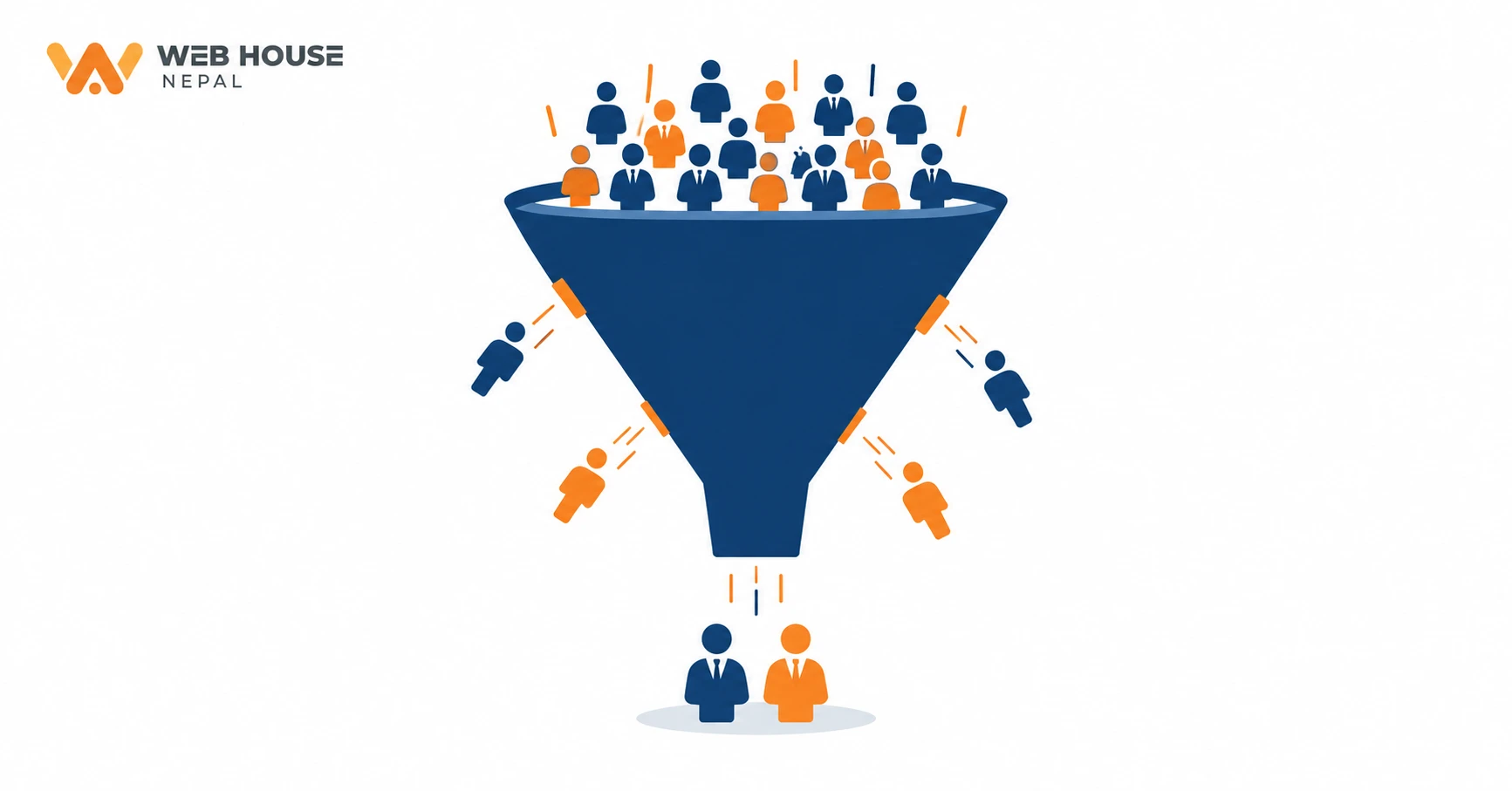
Traffic and customers are not the same thing. Your analytics might show a few hundred visitors a month, and that number feels good. But if those visits produce almost no calls, form submissions or WhatsApp messages, you don't have a traffic problem. You have a conversion problem.
Website conversion just means a visitor doing the thing you want them to do: calling you, booking, sending an enquiry or buying something. When visits stay steady and enquiries stay near zero, something on the page is getting in the way. The usual suspects are:
-
No clear next step. The page describes your business but never tells the visitor what to do. A "Contact Us" link hidden in the footer isn't a call to action.
-
Confusing navigation. The visitor wants prices or service details and can't find them within a click or two.
-
Weak messaging. The text talks about the company ("established with a vision to excel") instead of what the customer actually gets.
-
Nothing to build trust. No real photos, no address, no reviews, no examples of past work.
-
A painful contact process. A form with twelve required fields, a phone number placed inside an image so it can't be tapped, or an email address that bounces.
Here's a situation we see often. A trekking agency in Thamel has a lovely homepage full of mountain photos. A couple in Australia found it and wanted to know roughly what the Annapurna Base Camp trek would cost for two people in October. The itinerary page has no price guide and no "Ask for a quote" button, and the only way to get in touch is a general form at the bottom of the contact page. So they opened two other agencies' sites. One shows a starting price and a WhatsApp button right on the trek page. That's the agency that gets the message.
How to check: Look at your most-visited pages and ask yourself, "If I were a stranger, what would I do next on this page?" If the answer isn't obvious, that's where to start.
2. Your Website Takes Too Long to Load
You've probably done this yourself: tapped a link, stared at a blank white screen, and pressed back before anything appeared. Your visitors do exactly the same. Every extra second of loading gives them time to lose interest, and on mobile data that patience runs out even faster.
Website speed problems usually come from a handful of causes.
Oversized images are the most common one by far. A photo taken straight from a phone or DSLR can be several megabytes on its own. Put ten of those in a homepage slider and every visitor has to download all of them before the page feels usable. Resizing images to the size they're actually shown at, compressing them, and using a modern format like WebP often makes a big difference by itself.
Then there are scripts and add-ons. A chat widget, three different tracking codes, a social media feed, a popup tool and an animation library each add a little weight. On WordPress sites in particular, plugins tend to pile up over the years, and many of them are still loading on every page even if nobody remembers why they were installed.
Hosting matters too. Very cheap shared hosting can put your site on a crowded server that's slow to respond, and no amount of tidying up the page will fully fix a slow server. Outdated technology adds to the problem: an old theme, an unsupported PHP version or a page builder that produces bloated code can all drag performance down.
Finally, remember that your office computer on a fibre connection is the best-case scenario. Many of your customers are on a mid-range Android phone using mobile data. That's the experience worth testing.
How to check: Run your homepage and one or two key pages through Google's free PageSpeed Insights tool and look at the mobile results. Don't chase a perfect score. Focus on the main issues it flags, which are usually images, unused scripts and server response time.
3. Your Website Looks Fine on a Computer but Poor on Mobile
Most website designs get approved by someone sitting at a laptop. But think about where your customers actually find you: a Facebook post, an Instagram story, a Google Maps listing, a link shared on Viber or WhatsApp. Almost all of those happen on a phone, so for many businesses the mobile version is the website.
The common mobile problems are easy to spot once you look for them. Text is so small you have to pinch and zoom to read it. Buttons sit so close together that tapping "Call" opens "Email" instead. A wide table or image pushes the page sideways, so it wobbles left and right as you scroll. The menu doesn't open properly, or it opens and covers everything with no obvious way to close it. A popup appears that's bigger than the screen, and the close button is out of reach.
A simple example: a restaurant in Lalitpur puts its menu online as a PDF. On a computer it opens in a new tab and looks fine. On a phone, it downloads as a file, opens in a separate app, and the customer has to zoom around a tiny page to find the momo prices. Plenty of people give up and order from a delivery app where the menu is easy to scroll. A plain, well-built menu page would have kept those orders.
A mobile-friendly website isn't just one that technically fits on the screen. It's one where the main task, whether that's finding a price, booking a room or calling you, is easy to do with one thumb.
How to check: Open your website on your own phone, and if you can, on an older or cheaper one too. Try to do the one thing you most want customers to do. Write down every moment where you had to zoom, hunt or tap twice.
4. Visitors Can't Quickly Understand What Your Business Does
The top part of your homepage, the bit people see before they scroll (often called "above the fold"), has one job. It needs to tell visitors they're in the right place. Within a few seconds, someone should be able to answer four questions: What do you offer? Who is it for? Why should I consider you? What should I do next?
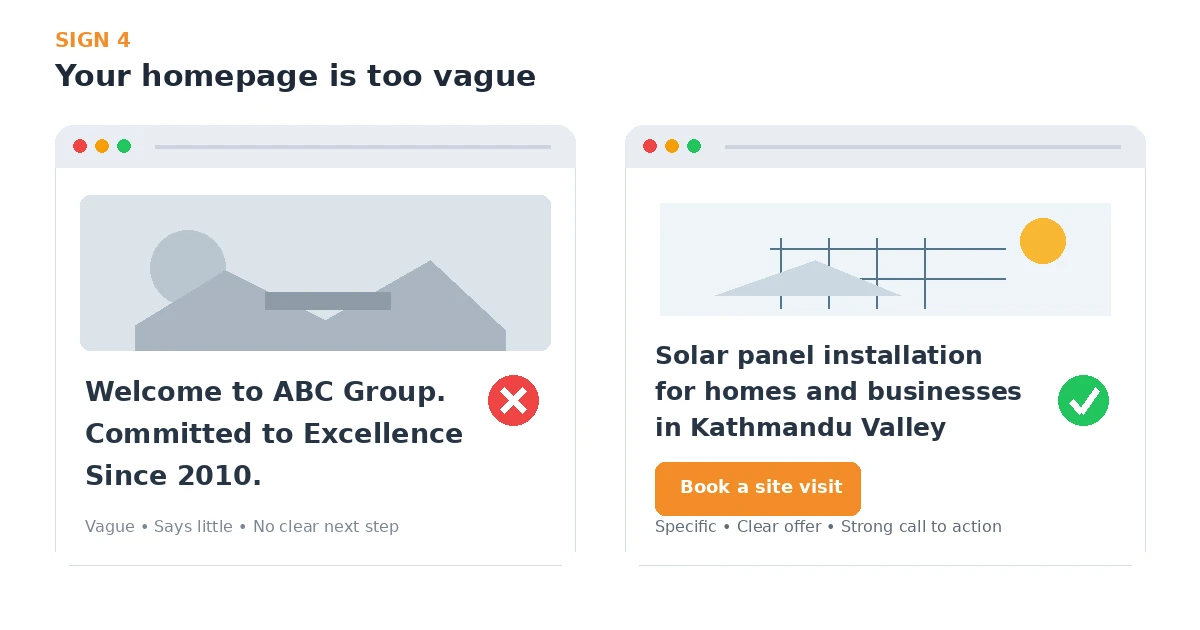
Compare these two homepage headlines.
The first says: "Welcome to ABC Group. Committed to Excellence Since 2010." It sits over a stock photo of two people shaking hands. It sounds professional, but it tells the visitor nothing about what ABC Group actually does.
The second says: "Solar panel installation for homes and businesses in Kathmandu Valley. Free site visit and quotation." Below it is a button that says "Book a site visit." It's less poetic, but a visitor knows straight away whether this company can help them, and what to do if it can.
Vague words like "solutions", "innovative" and "one-stop" make people work to figure you out. So do sliders that rotate through five different messages, and headlines that are just a company slogan. Some visitors will scroll down and dig. Most won't bother when a competitor's site answers the question immediately.
How to check: Show your homepage to a friend who doesn't know much about your business for five seconds, then close it. Ask them what you do and who you do it for. If they hesitate, your headline needs rewriting.
5. Your Website Looks Outdated or Doesn't Feel Trustworthy
People judge your business by your website before they've spoken to anyone on your team. That doesn't mean you need a flashy design with animations everywhere. In fact, heavy effects often make a site slower and harder to use. What visitors are looking for is simpler: does this look like a real, active, professional business?
Small details answer that question more than most owners realise. A footer that still says "© 2019". A "Latest News" section whose newest post is three years old. Blurry or stretched photos, or stock images of people who obviously don't work for you. Links that lead to "Page not found". A browser warning that says "Not secure" because the site has no SSL certificate. Spelling mistakes in the main headline. A logo and colours on the website that don't match your Facebook page or visiting card.
Missing information hurts just as much. If there's no physical address, no landline, no team photo and no company details, visitors start to wonder who they're dealing with. In Nepal this matters a lot for any business that asks for advance payment, such as travel agencies, education consultancies and training institutes. For international customers booking from abroad, clear policies, genuine reviews and visible registration details do the same job.
A professional website is one that looks current, works properly, and makes it easy to verify that you're legitimate. Nothing more complicated than that.
How to check: Open your website next to the websites of your three closest competitors. Be honest with yourself: if you were spending your own money, whose would you trust?
6. Your Website Is Difficult to Find on Google
This one is different from the others. Instead of turning visitors away, a website that's hard to find never gets the chance to meet them. When someone searches "dental clinic in Baneshwor" or "hardware shop in Butwal" or "accounting software in Nepal" and you don't appear, those customers go to whoever does. You'll never see them in your analytics because they never arrived.
Website SEO and website quality are closely linked. Google is trying to show people pages that answer their question well, so a lot of what makes a site better for humans also helps it rank. A few areas make the biggest difference for most small and medium businesses.
Pages that match what people search for
This is called search intent. If people search "AC repair Kathmandu price" and your only relevant page is a general "Our Services" list, you're unlikely to show up. A separate, genuinely useful page for each main service, written around the questions customers actually ask, gives Google something specific to rank.
The basics most sites get wrong
Check that every important page has its own descriptive page title and meta description. These are what people see in Google's results, and a surprising number of business sites still have pages titled just "Home" or "Untitled". Use clear headings on each page, and link related pages to each other so both visitors and Google can find your deeper content.
Technical and local SEO
On the technical side, Google needs to be able to crawl and index your pages without errors, and the site needs to be fast and mobile-friendly, which takes us back to signs 2 and 3. For local businesses, a properly set up Google Business Profile with the same name, address and phone number as your website, plus genuine customer reviews, often matters as much as the website itself.
How to check: Open a private or incognito browser window and search for the terms your customers would use, including your area. Then set up Google Search Console, which is free. It shows which searches your site appears for, how often people click, and whether any pages have indexing problems.
7. You Haven't Updated Your Website in Years
A lot of businesses treat their website like a printed brochure: get it made once, then forget about it. But your business doesn't stand still. You add services, drop others, move offices, change prices and hire new people. If the website doesn't keep up, it slowly starts telling customers things that aren't true.
Think about what might be out of date for you right now. Services you stopped offering are still listed, while the new ones you're proud of aren't mentioned at all. The phone number is an old one, or the address is from before you moved. The team page shows people who left two years ago. Blog posts still mention pandemic-era rules or "plans for 2021". Each of these either sends customers in the wrong direction or makes them wonder whether you're still operating.
There's also a side of this that owners can't see. Content management systems like WordPress, along with their themes and plugins, need regular updates. Outdated plugins are one of the most common ways small business sites get hacked, and a hacked site can end up redirecting visitors to spam pages or being flagged with a warning in Google's results. Older hosting setups and software versions also eventually stop receiving security fixes.
Customer expectations shift as well. Today, many people expect to message a business on WhatsApp, book online, or pay through eSewa, Khalti or a card. A site built several years ago may simply not support the way your customers now prefer to deal with you.
How to check: Read every page of your site as if you were a new customer, and list anything that's no longer accurate. Then put a reminder in your calendar to do the same review every three months.
Quick Website Health Check
If you only have ten minutes, go through these questions with your website open on your phone. Answer honestly, and pay attention to anything you're unsure about.
-
Can someone understand what my business does within a few seconds of landing on the homepage?
-
Can visitors find my phone number, WhatsApp or contact form without searching for it?
-
Does every key page have a clear next step, like "Call now", "Get a quote" or "Book"?
-
Does the website work properly on a phone, without zooming or sideways scrolling?
-
Does it load quickly on mobile data, not just on office Wi-Fi?
-
Are my services, prices, address and team information all current?
-
Does the browser show the site as secure (a padlock, not "Not secure")?
-
Do I show up on Google when I search for my main service and my area?
-
Does my website look as trustworthy as my competitors' websites?
Two or three "no" or "not sure" answers are normal. They're also a good indication of where to focus first.
What Should You Do Next?
When owners realise their website has problems, the first instinct is often "we need a new website." Sometimes that's true. But a full website redesign isn't always the answer, and it can be an expensive way to repeat the same mistakes. A brand-new site with the same vague headline, the same oversized images and the same cheap hosting will lose customers in exactly the same way.
It's better to identify the actual problem first, then match the fix to it.
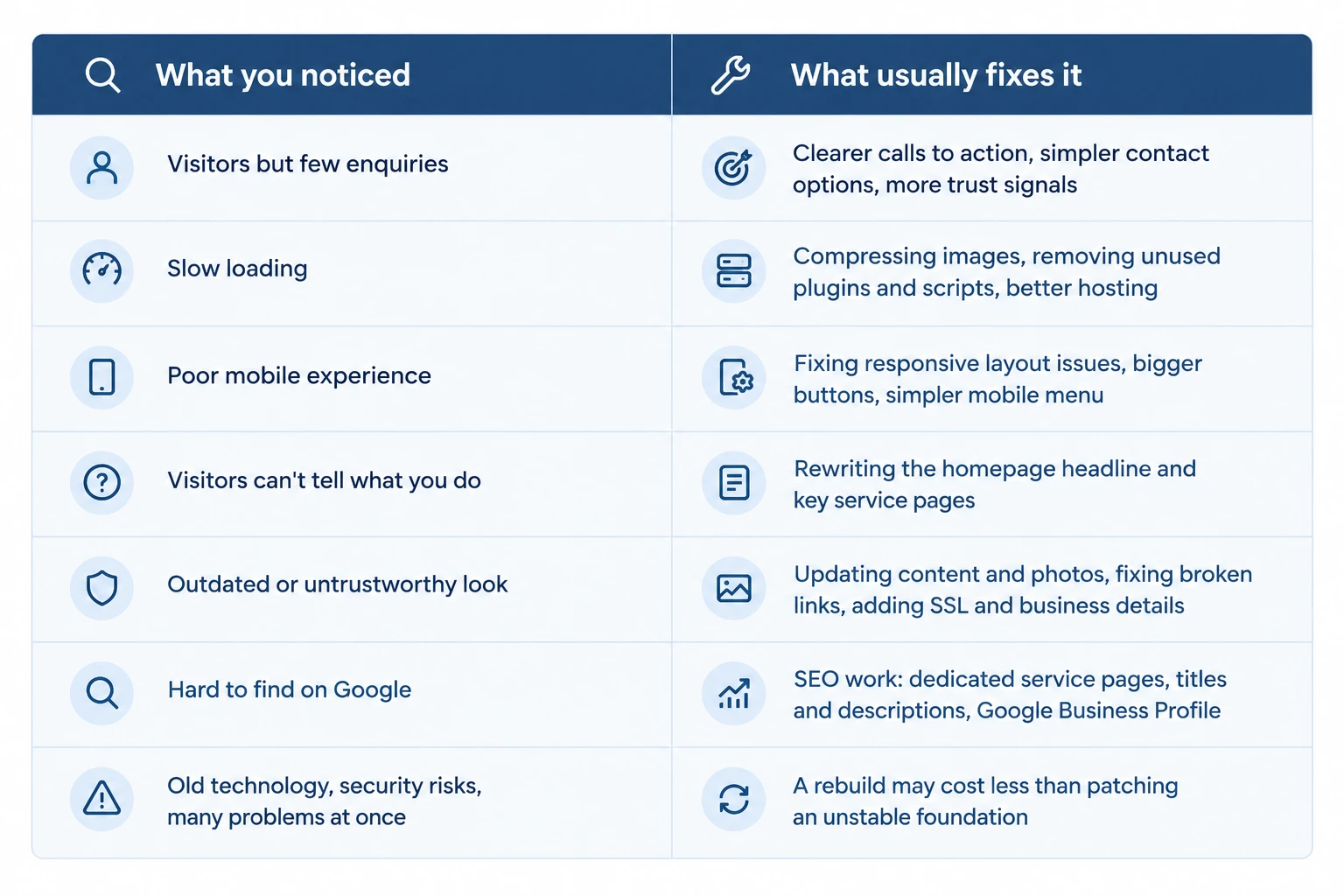
A sensible order for most businesses is to start with the things closest to the enquiry: the homepage message, the contact path, and how the site works on a phone. Those tend to have the most direct effect on whether visitors get in touch. Speed and SEO improvements come next, and they build up over time.
While you're making changes, start measuring. Make sure analytics and Google Search Console are set up, and ask new customers how they found you. Even a simple note in a notebook helps you see whether the changes are working.
A complete rebuild makes sense when the foundation itself is the problem. That might be a site that isn't responsive at all, one built on software that can no longer be safely updated, or one you can't edit without calling a developer for every small change. In those cases, patching can end up costing more than starting fresh.
Want a Second Pair of Eyes on Your Website?
You can do a lot of this checking yourself, and we'd encourage you to start with the health check above. If you'd rather have someone experienced look at it with you, Web House Nepal works with businesses in Nepal and abroad on website design and development, responsive websites, SEO, website performance and digital marketing.
We're happy to go through your current site and point out what we think is holding it back, and what we'd fix first. Sometimes the honest answer is a few targeted changes rather than a new website, and we'll tell you if that's the case. Feel free to get in touch whenever you're ready.
Frequently Asked Questions
How do I know if my website is losing customers?
The clearest sign is a gap between visits and enquiries. If your analytics show regular traffic but you rarely get calls, messages or form submissions from the website, visitors are leaving before they act. Check your top pages on a phone, look for a clear next step on each one, and ask new customers whether they looked at your site before contacting you.
What makes a business website ineffective?
Usually it's a combination of small things rather than one big failure: an unclear headline, no obvious way to get in touch, slow loading, a poor mobile layout, outdated information and very little visibility on Google. Each one turns away some visitors, and together they can mean the website brings in far fewer enquiries than it should.
Does website speed affect customers?
Yes. Slow pages test people's patience, especially on mobile data, and many will leave before the page finishes loading. Speed is also one of the factors Google considers for user experience. The most common fixes are compressing images, removing scripts and plugins you don't need, and using reliable hosting.
How important is a mobile-friendly website?
For most businesses, it is very important. A large share of visitors arrive from social media, Google Maps and messaging apps on their phones. If text is hard to read or buttons are hard to tap, those visitors often leave. Google also primarily uses the mobile version of a site when indexing and ranking it.
When should a business redesign its website?
Consider a full redesign when the problems are in the foundation: the site isn't responsive, it runs on software that can't be safely updated, it's hard to edit, or it no longer reflects what your business does. If the issues are limited to content, speed or a few pages, targeted fixes are usually quicker and cheaper.